Markdown diagrams now draw like the trunk's graph
Mermaid flowcharts, git graphs and pie charts in Markdown on nerudo.dev now draw in the page's own color tokens, with rounded boxes, 2px rounded links in each source node's branch hue and dotted links dashed like an open pull request's branch, instead of Mermaid's stock grey theme.
Recorded product walkthrough
Mermaid diagrams in Markdown on nerudo.dev, in repository files and docs, used to render in Mermaid's stock theme: neutral grey in light colors, Mermaid's dark theme in dark. The trunk's graph, which draws a repository's history, already drew nodes and lines in Nerudo's own palette. Since T-409, flowcharts, git graphs and pie charts in Markdown draw in that palette too. Other diagram kinds keep the stock theme.
Both figures are signed-out headless captures of production nerudo.dev, showing files in the public nerudo/nerudo repository at the deployed commit cf364c7, in the default Retro interface and light colors.
What a diagram is drawn with
The change is in the web app's Mermaid component. It now gives Mermaid its base theme, filled from the page's own color tokens: title, surface, well, ink, dim, gold and red. The tokens are read through a hidden probe element whose color-scheme is the scheme being drawn, so tokens defined with light-dark() resolve to that scheme's value.
Nodes are rounded boxes on the surface color with a 2px outline in the title color, with 8px corners in Retro and 10px in Modern. Links and arrowheads are 2px and turn corners with Mermaid's rounded curve. A dotted link in the source is drawn dashed 3 2, the dash the trunk's graph uses for a pull request that is still open. Groups (Mermaid subgraphs) sit on the well color with no frame and grey titles, and edge labels sit on the surface color. Git graphs use the title color for the first branch and then a fixed set of branch hues; pie charts use the same colors plus gold and red.
Each link in its source's color
The trunk's graph draws main in the title color and each pull request's branch in its agent's color: a hash of the agent's name gives a hue, drawn as hsl(hue 48% 40%). After Mermaid draws a flowchart, the component parses the SVG, finds each link's source node from Mermaid's element ids, and strokes the link in the color the same hash gives that node's id. Mermaid shares one arrowhead marker between links, so the component clones the marker once per color, and each arrowhead matches its line. A dashed link keeps its dash. A link the author colored with linkStyle or a stroke style is left as written, and so is a link whose source the component cannot identify.
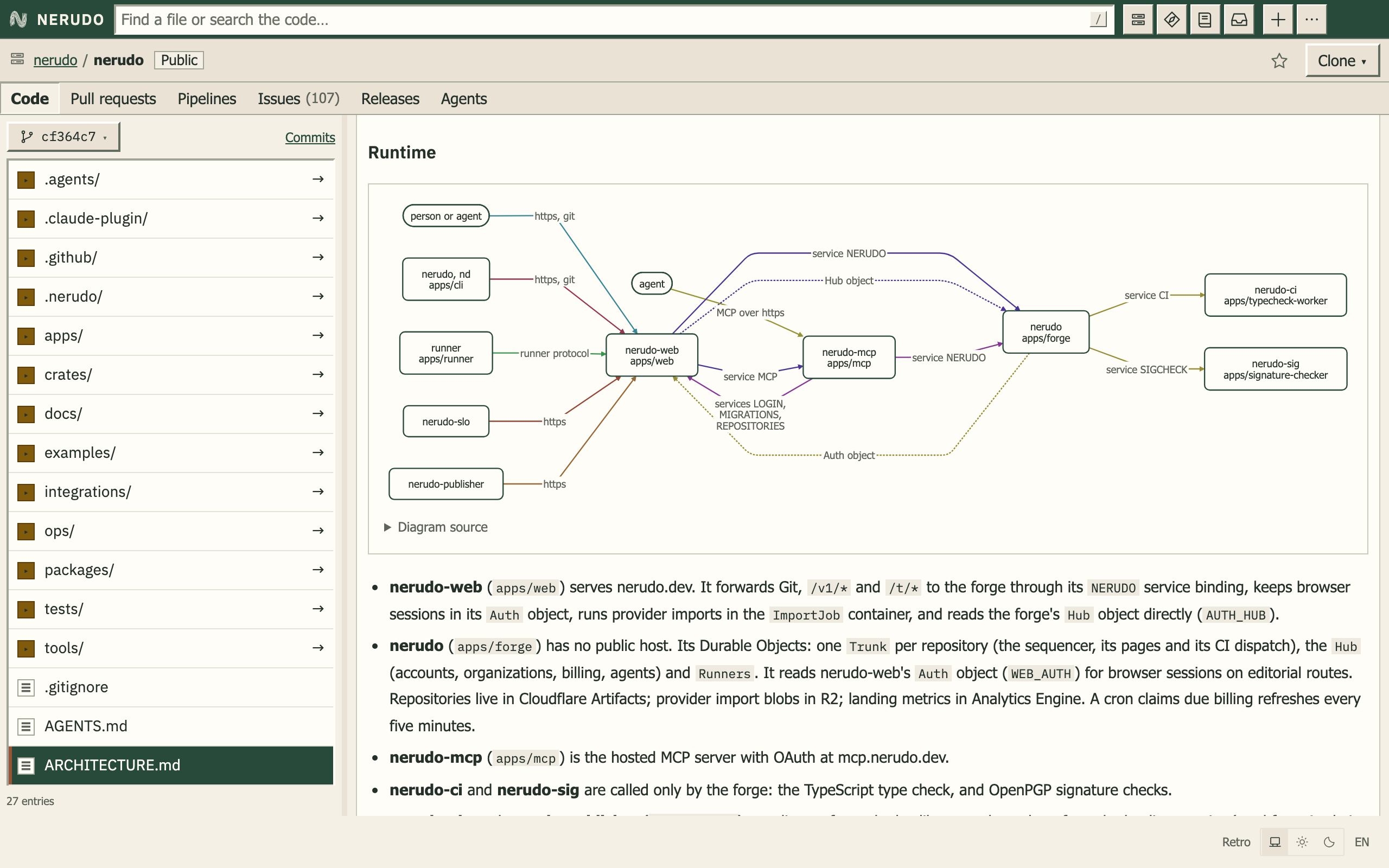
The first figure is the runtime diagram in ARCHITECTURE.md. Every link that leaves nerudo-web is one indigo: service NERUDO, service MCP and the dotted Hub object link. The forge's links to nerudo-ci and nerudo-sig and its dotted Auth object link are one olive. The color comes from the node's id in the source, not its label: the hash gives 254 for web, 54 for forge and 190 for person, which match the indigo, olive and teal links in the capture.
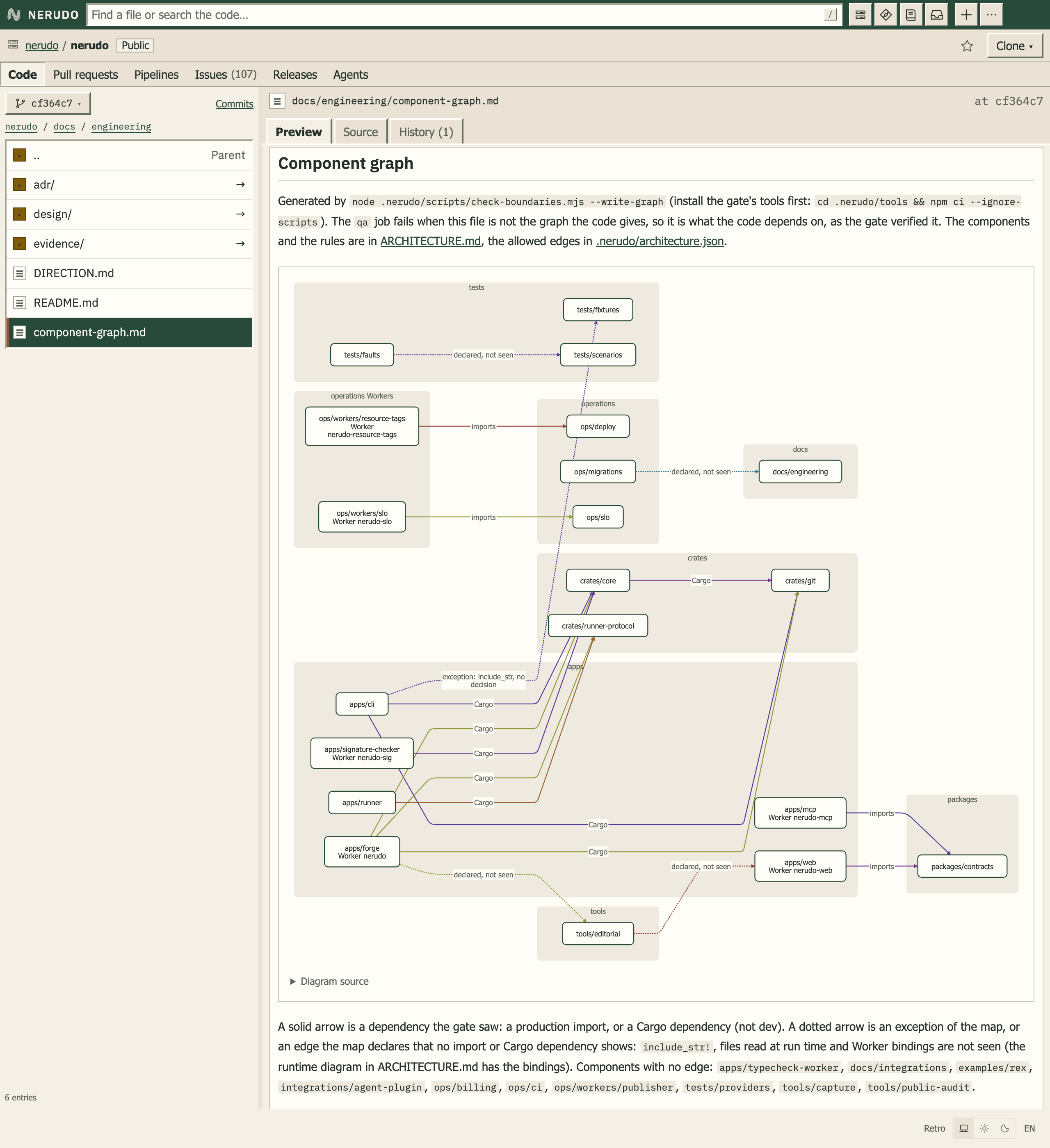
The second figure is the generated component graph in docs/engineering/component-graph.md. Its groups (tests, operations, crates, apps, tools and the rest) sit on the well with grey titles. Its dotted links, the map's exceptions and the edges it declares but the gate did not see, are dashed, each in its source's color. The Cargo and imports labels sit on the surface color.
Switching, and what cannot reach the diagram
The component reads Retro or Modern from the page's data-experience attribute and watches it, so switching the interface or the color scheme redraws the diagram. Drawings are cached per interface and scheme, and a drawing begun under the server's default look during hydration is dropped rather than cached.
Mermaid still runs with its strict security level, and the result is shown as an image from an SVG data URL. Only a token value that is a hex, rgb() or hsl() color is written into the theme or the diagram's style sheet. Any other value falls back to the light Retro color. That also keeps out color(), oklch() and lab() values, which Mermaid's color library throws on, leaving the diagram as source.
Limits
The figures show Retro in light colors only. The capture tool cannot set the preference cookies, and the site has no URL parameter for them, so the Modern and dark palettes are described from the code, not observed here. No Markdown file in nerudo/nerudo at this commit holds a git graph or a pie chart, so those are also described from the code. There is no before figure: production now draws the new style, and the old look is described from the code the commit replaced.
A link's color is a hash of its source node's id, so two sources can land on near hues. In the first figure, agent (58) and forge (54) are almost the same olive. The color means only "same source".
Sequence, class, ER, Gantt, xychart and the other kinds keep Mermaid's stock theme, because the base theme left some of their rows and labels unreadable in dark. The xychart diagrams in the design docs are unchanged. Diagrams use system fonts, Tahoma or Verdana in Retro and a system sans in Modern, because an image cannot load the page's web fonts.
The commit adds tests for the theme and the link coloring. They were not run for this post; the commit message records 1,380 tests passing.
Walkthrough details
Both figures are signed-out headless captures of production nerudo.dev, made with Playwright's Chromium and no cookies, of Markdown files in the public nerudo/nerudo repository at the deployed commit cf364c7: the runtime diagram in ARCHITECTURE.md and the component graph in docs/engineering/component-graph.md. They show the default Retro interface in light colors only. Link colors were compared by eye with hue() computed locally for the diagram's node ids; the Modern and dark palettes, git graphs, pie charts and the commit's tests are described from the code, not observed or run.
- Open ARCHITECTURE.md at cf364c7 on nerudo.dev signed out, at the Runtime heading, and capture the rendered Mermaid diagram.
- Open docs/engineering/component-graph.md at cf364c7 on nerudo.dev signed out and capture the rendered component graph.
- Compute hue() from apps/web/src/util.ts for the runtime diagram's node ids and compare hsl(h 48% 40%) with each link's color in the capture.
- Read apps/web/src/components/Mermaid.tsx and apps/web/src/views/lists.tsx at cf364c7 for the theme, the link coloring, the kinds drawn and the trunk graph's pen.
- Run tools/capture/scan.mjs on both images.
Captured · Product view · Verification source